
01Free Template · Excel and PDF
Expense Report Template: Free Excel & PDF with Mileage
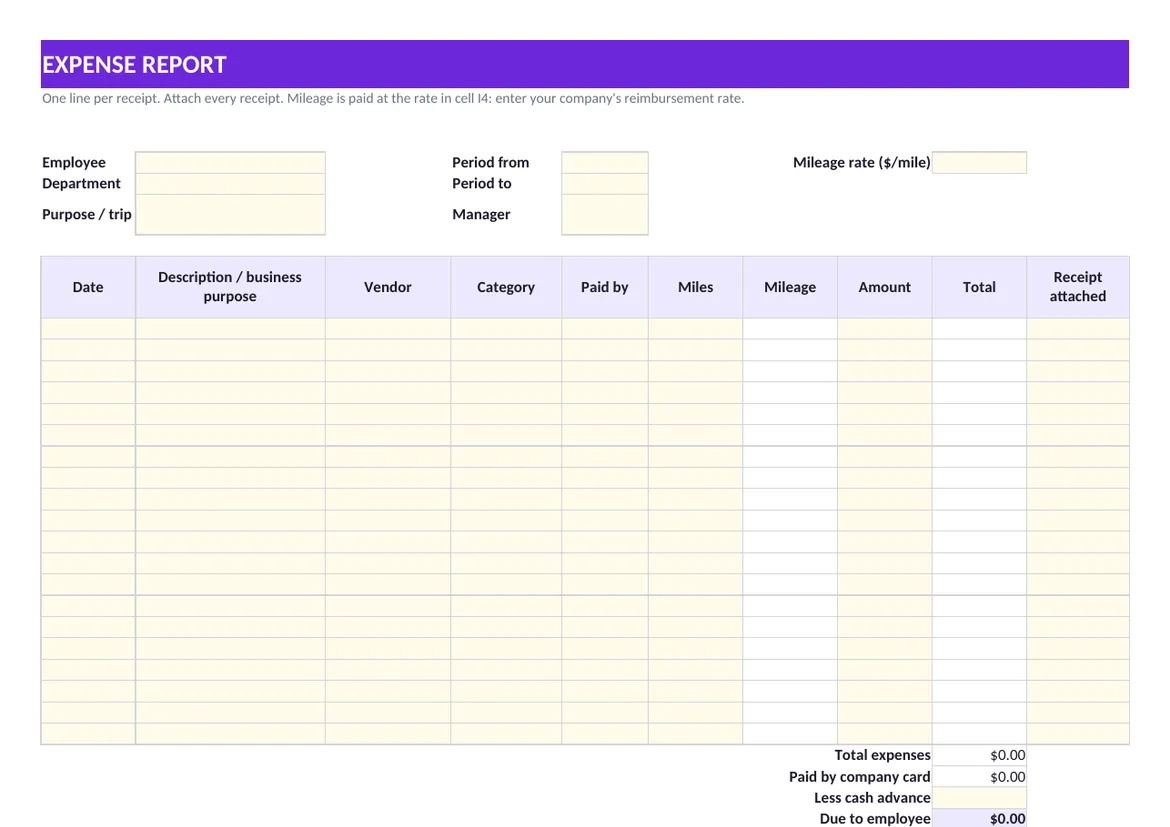
Free expense report template in Excel and PDF: one line per receipt, categories, mileage at your rate, company card vs. out of pocket, and the amount due to the employee.
How to Fill In the Expense Report
- 1. Header. Employee, department, the period covered and the purpose of the trip or project.
- 2. Mileage rate. Enter the per-mile rate your company reimburses. The sheet multiplies it by the miles on each line.
- 3. One line per receipt. Date, what it was and why, the vendor, a category and the amount. A business purpose on every line saves the questions later.
- 4. Paid by. Mark each line Employee or Company card. Only out-of-pocket lines are reimbursed.
- 5. Receipt attached. Yes or No on each line; a No is a line the approver will ask about.
- 6. Advance and signatures. Subtract any cash advance; the employee signs and the manager approves.
What Makes an Expense Report Easy to Approve
| Habit | Why it helps |
|---|---|
| Submit by period, not by pile | A weekly or monthly report lands in the right accounting period |
| Write the business purpose | "Dinner" raises a question; "Dinner with buyer from Acme, contract renewal" answers it |
| Keep card and cash apart | The company already paid the card; reimbursing it again is the most common error |
| Use fixed categories | The same categories every month make spending comparable |
| Attach every receipt | The report is a summary; the receipts are the evidence |
Tax treatment of reimbursements depends on your company's policy and on IRS rules; ask your accountant how your plan should be set up. The template records the facts either way.
From Spreadsheet to Approval Workflow
Spreadsheets work until reports wait in an inbox and nobody knows which were paid. Draivix applies the same discipline to supplier bills: received invoices pass through your configured approval workflow before payment and nobody can approve their own, and AI document data extraction prepares the draft from an email attachment or uploaded file for a person to review. How employee expenses run in your company is set up when the system is tailored to you.
02Frequently Asked Questions
What is an expense report?
A document in which an employee lists business expenses for a period, with the date, purpose, category and amount of each and the receipts attached, so the company can approve, reimburse and record them.
How do I calculate mileage on an expense report?
Multiply the business miles driven by your company's per-mile reimbursement rate. In the template you enter the rate once and the miles on each line; the sheet does the rest.
Should company card purchases go on the expense report?
Yes, so that every expense has a purpose and a receipt, but mark them as paid by company card. The template totals them separately and leaves them out of the amount due to the employee.
How often should expense reports be submitted?
On a fixed rhythm, weekly or monthly, so expenses land in the period they belong to and employees are not left waiting for their money.
03More Free Tools
Related Templates & Calculators
- Packing List Template: Free Packing Slip (Excel & PDF)Free packing list template in Excel and PDF: quantities ordered, shipped and back-ordered, box and lot numbers, carrier and tracking, and a receiving signature.Open
- California Minimum Wage 2026–2027, Overtime & Break LawsCalifornia minimum wage: $16.90 in 2026, $17.40 from January 1, 2027. Daily overtime, double time, meal and rest breaks, sick leave and time records, sourced.Open
- New York & NYC Minimum Wage 2026–2027, Overtime LawsNew York minimum wage: $17.00 in NYC, Long Island and Westchester, $16.00 upstate, unchanged in 2027. Overtime, spread of hours, meal periods and records.Open
- Illinois & Chicago Minimum Wage 2026–2027, Overtime LawsIllinois minimum wage is $15.00 an hour; Chicago is $17.05 for employers with 4 or more employees. Overtime, day of rest, meal periods, paid leave, BIPA and time clocks.Open
Let’s start together
Tell us how your business works.
We will show you what a system that takes over part of that work could look like.
Book a consultation