
01Free Online Calculator + Excel Workbook
Markup Calculator: Selling Price From Cost, and Markup vs Margin
Find the selling price from cost and markup, turn a target margin into a markup, or get both from a price. Formulas, a markup to margin chart and examples.
Markup Calculator
Markup is profit divided by cost and margin is profit divided by selling price; the figures exclude sales tax, discounts and overhead, so check the cost you enter is the price you actually pay.
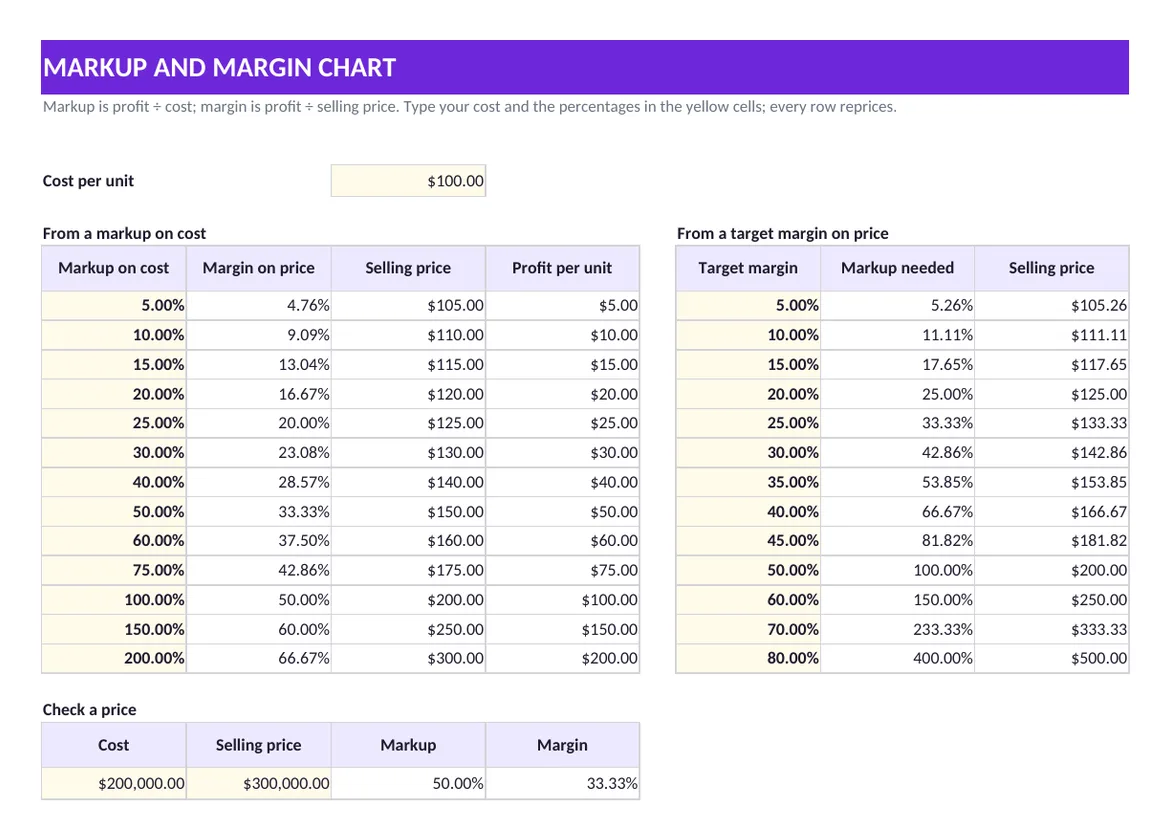
Markup is profit as a share of cost; margin is profit as a share of the selling price. To price an item, multiply its cost by 1 plus the markup: a $40 item with a 50% markup sells for $60. That $20 profit is 50% of the cost but only 33.33% of the price, so a 50% markup is a 33.33% margin. The calculator works from cost and markup, from cost and a target margin, or from cost and price.
IRS Publication 334 offers the same idea as a check of your own bookkeeping: a retailer or wholesaler can divide gross profit by net receipts and compare the result with the markup policy: in its example, $300,000 of net receipts and $200,000 cost of goods sold give $100,000 gross profit, 33⅓% of sales. That is a 50% markup on cost, and the calculator reproduces it.
Markup to Margin Chart
| Markup on cost | Margin on price | Price of a $100 cost item |
|---|---|---|
| 10% | 9.09% | $110.00 |
| 20% | 16.67% | $120.00 |
| 25% | 20.00% | $125.00 |
| 30% | 23.08% | $130.00 |
| 40% | 28.57% | $140.00 |
| 50% | 33.33% | $150.00 |
| 60% | 37.50% | $160.00 |
| 75% | 42.86% | $175.00 |
| 100% | 50.00% | $200.00 |
| 150% | 60.00% | $250.00 |
| 200% | 66.67% | $300.00 |
Computed with margin = markup ÷ (1 + markup). The other way round, markup = margin ÷ (1 − margin): a 25% target margin needs a 33.33% markup, and a 40% margin needs 66.67%. The Excel chart has the same table with a yellow cost cell that reprices every row.
Which Cost Goes Into the Markup
Markup only works when the cost is right. Publication 334 says to use the prices you actually pay, not the list prices, when you figure the cost of purchases: a trade discount reduces cost. A manufacturer's cost includes raw materials and parts, and for inventory also the other costs the IRS lists in the cost of goods sold. Freight in, duties and packaging belong in the cost too if you want the markup to cover them.
Retail gross margins vary by line of business; the U.S. Census Bureau publishes them by kind of business in the Annual Retail Trade Survey. Comparing your own margin, not your markup, with those tables is the like-for-like comparison. For margin-first pricing, the margin calculator starts from the price.
Worked Examples and How to Use the Calculator
A distributor buys a part for $70 and sells it for $100. Profit is $30, the markup is 42.86% and the margin 30.00% (computed). If the owner wants a 50% margin on a $40 item instead, the price must be $40 ÷ (1 − 0.50) = $80.00, a 100% markup.
In the calculator, choose what you know, enter the cost, the percentage and, for the third mode, the selling price. The result shows the price, the profit per unit and both percentages, so a quote can be checked against the margin your business needs.
Common mistakes
- Adding a 30% markup and expecting a 30% margin; it gives 23.08%.
- Using the list price instead of the discounted price you pay as the cost.
- Leaving freight in and duties out of the cost.
- Applying markup to a price that already includes sales tax.
- Comparing your markup with industry margin figures.
Pricing Rules in Draivix
In Draivix Product Catalog & Price Lists, each product has a pricing method, such as markup on purchase price, margin or a fixed selling price, and the system recalculates the derived prices every time the product is saved. Supplier items on the product carry the purchase price, so the markup starts from the cost you actually pay. Price lists carry a currency, price tier, customer type and valid-from date, and each product price in them a percentage discount and validity period.
Last reviewed: November 23, 2026. Formulas are arithmetic; the IRS example is from Publication 334 (2025). This page is general information, not tax advice.
02Frequently Asked Questions
How do I calculate markup?
Markup = (selling price − cost) ÷ cost. An item that costs $40 and sells for $60 has a $20 profit and a 50% markup.
What is the difference between markup and margin?
Markup divides profit by cost; margin divides profit by the selling price. The same $20 profit on a $40 cost and $60 price is a 50% markup and a 33.33% margin.
How do I convert a margin to a markup?
Markup = margin ÷ (1 − margin). A 25% margin needs a 33.33% markup, and a 50% margin needs a 100% markup.
What selling price gives a 50% markup?
Cost × 1.5. A $70 cost becomes a $105 price, and the margin is 33.33%.
Can margin be over 100%?
No. Margin is profit divided by price, and profit is always less than the price, so margin stays below 100%. Markup has no upper limit: a 200% markup is a 66.67% margin.
03More Free Tools
Related Templates & Calculators
- Decimal Hours Converter and Minutes to Decimal ChartConvert hours and minutes to decimal hours for payroll and back, with a printable minutes to decimal chart and the federal rule on rounding time clock punches.Open
- 1099 vs W-2: Contractor or Employee and the Real Cost1099 contractor or W-2 employee: the IRS common-law test, the DOL rule effective January 22, 2027, and a calculator for what each costs the employer.Open
- 2027 Payroll Calendar: Weekly, Biweekly, SemimonthlyFree 2027 payroll calendar in Excel and PDF: 53 weekly Fridays, 26 or 27 biweekly paydays and 24 semimonthly dates, each moved off bank holidays.Open
- Statement of Work Template: Free SOW in Excel and PDFFree statement of work template in Excel and PDF: scope, deliverables with acceptance criteria, milestones that add up to the fee, assumptions and sign-off.Open
Let’s start together
Tell us how your business works.
We will show you what a system that takes over part of that work could look like.
Book a consultation