
01Free Template · Excel and PDF
Employee Schedule Template: Free Weekly Work Schedule (Excel + PDF)
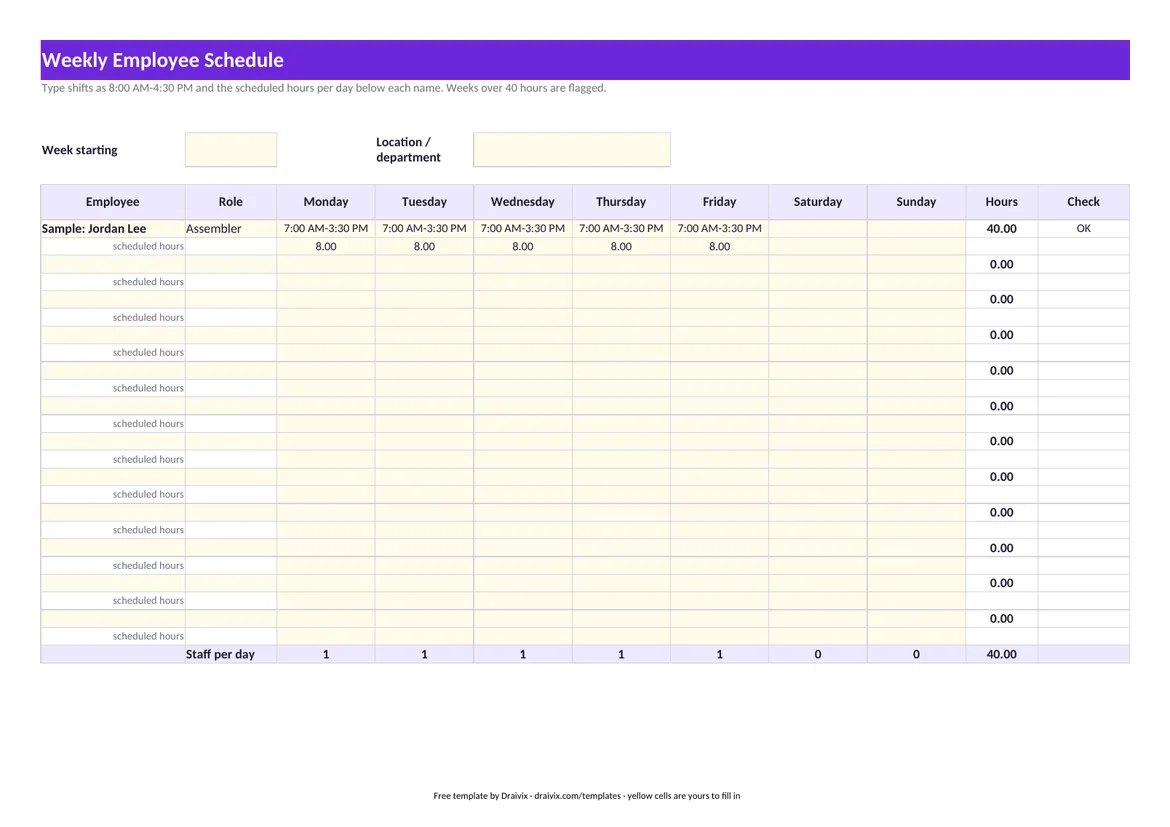
Free weekly employee schedule template in Excel and PDF: shifts for 12 employees, hours per person, staff per day and a flag for weeks over 40 hours.
How to Build a Weekly Work Schedule
- 1. Start from demand. Write down how many people each day and shift needs before you write any names. The staff-per-day row at the bottom shows whether the plan covers it.
- 2. Place fixed constraints first. Approved time off, part-time limits and people who can only work certain days go in before everyone else.
- 3. Fill the shifts and watch the hours. Type the shift and the scheduled hours for each day. The sheet totals the week for each person and flags anyone scheduled over 40 hours, where federal overtime begins.
- 4. Post it and keep the version. Print the PDF or share the file, and save one copy per week. When a shift is swapped, change the schedule, not just the conversation.
Scheduling Rules to Check Before You Post
- Overtime. Federal overtime is counted per workweek after 40 hours (DOL Fact Sheet #23); California also counts it per day (see the California overtime calculator). A schedule that looks balanced over two weeks can still create overtime in one of them.
- Advance notice. Some cities and states have predictable-scheduling laws for certain industries that require schedules to be posted days ahead and pay a premium for late changes. Check your city and state before you set a posting routine.
- Breaks and rest. Meal and rest break rules are set by the states. Build required breaks into the shift lengths you schedule.
A schedule says who should work; a time record says who did. Draivix keeps both in one place: planned days come from each employee's working calendar and approved absences, and actual clock ins from the attendance terminal, browser or phone land next to the plan. Shared resources such as meeting rooms, company cars or equipment are booked in Calendar & Resource Booking.
Last reviewed: November 18, 2026. This page explains general rules and is not legal advice.
02Frequently Asked Questions
How do I make an employee schedule in Excel?
List employees down the side and the days of the week across the top, enter each shift and its hours, and total the hours per person. The template has this layout ready for 12 employees with the totals and the over-40 flag built in.
Can I use the schedule for more than 12 employees?
Yes. Copy the sheet for each team or location, or insert more row pairs and copy the formulas down. The workbook is unlocked.
How far in advance must a work schedule be posted?
Federal law sets no advance notice for schedules. Some cities and states do for certain industries, so the answer depends on where your employees work and what your business does.
03More Free Tools
Related Templates & Calculators
- Invoice Template: Free Excel & Printable PDF (US)Free invoice template in Excel and PDF for US businesses: line items, sales tax rate, shipping, Net 30 due date and automatic totals. No sign-up.Open
- Purchase Order Template with 3-Way Match (Excel, PDF)Free purchase order template in Excel and PDF, with a three-way match sheet that compares PO, receipt and supplier invoice and flags lines to hold.Open
- Work Order Template: Service & Maintenance (Excel, PDF)Free work order template in Excel and PDF for service, maintenance and installation jobs: asset, work performed, parts, labor, tax and customer sign-off.Open
- RFID Time Clock System: Badge Readers, Cards & SetupHow an RFID employee time clock works, whether your existing access cards can be reused, what a badge reader needs on site, and what US law asks you to record.Open
Let’s start together
Tell us how your business works.
We will show you what a system that takes over part of that work could look like.
Book a consultation