
01Free Template · Excel and PDF
Invoice Template: Free Excel & PDF Invoice for US Businesses
Free invoice template in Excel and PDF for US businesses: line items, sales tax rate, shipping, Net 30 due date and automatic totals. No sign-up.
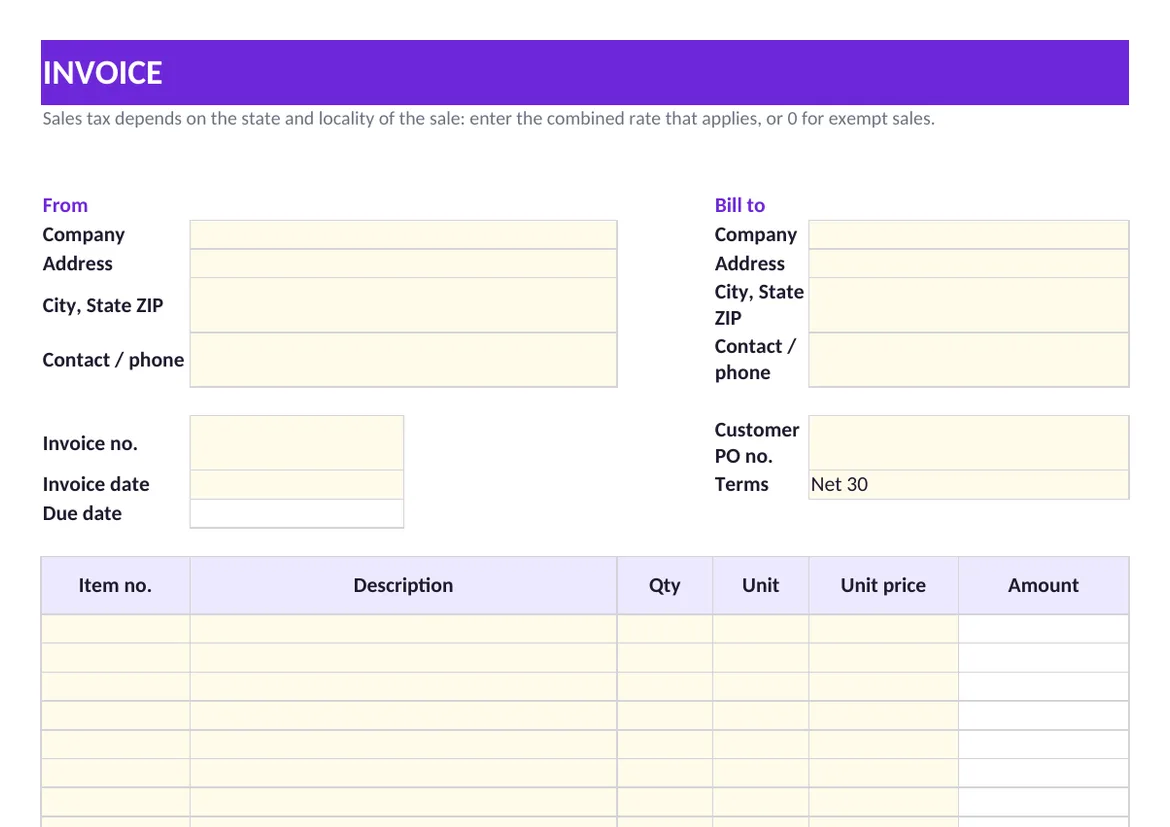
What to Put on an Invoice
| Field | What to enter | Why it matters |
|---|---|---|
| Invoice number | A unique number in sequence | Lets you and the customer refer to one document and spot gaps or duplicates |
| Invoice date and terms | The date issued and terms such as Net 30 | Starts the clock on payment; the template fills the due date |
| Customer PO number | The purchase order the customer issued | Many accounts payable teams will not pay an invoice they cannot match to a PO |
| Line items | Description, quantity, unit and unit price | Shows exactly what is billed, so the invoice can be checked against the order and delivery |
| Sales tax | The rate that applies to this sale | Sales tax depends on the state and locality of the sale and on what is sold |
| Payment instructions | How to pay: ACH details or check payee | Removes the most common reason for a payment delay |
Sales tax is set by states and localities, not by a federal rate, and some sales and customers are exempt. Enter the combined rate that applies to the sale, or zero for an exempt one, and keep exemption certificates with your records.
Getting Invoices Paid on Time
- Send it the day the work is done. The payment term runs from the invoice date, so every day of delay is a day added to the wait.
- Match the customer's process. Use their PO number and send to the address their accounts payable team reads.
- State the due date, not just the term. "Due December 18" is clearer than "Net 30".
- Follow up on a schedule. A reminder a few days before the due date and another right after it catch most late payments.
A template is enough for a few invoices a month. When invoicing becomes a daily job, Draivix Invoicing & Billing creates the invoice from the quote or order, recurring billing and reminders send repeat invoices and follow up on overdue ones, and payment reconciliation matches incoming payments to open invoices.
02Frequently Asked Questions
Is this invoice template free?
Yes. Download the Excel file or the PDF without signing up. The workbook is unlocked, so you can add your logo, change the terms and reuse it for every customer.
What does Net 30 mean on an invoice?
Payment is due 30 days after the invoice date. The template calculates that due date from the invoice date; change the formula if your terms are Net 15 or Net 60.
Do I have to charge sales tax on an invoice?
It depends on the state and locality of the sale, on what you sell and on whether the customer is exempt. There is no single national rate. Enter the rate that applies to the sale, or zero when no tax is due.
What is the difference between an invoice and a receipt?
An invoice asks for payment and states what is owed and by when. A receipt confirms that a payment was made.
03More Free Tools
Related Templates & Calculators
- Purchase Order Template with 3-Way Match (Excel, PDF)Free purchase order template in Excel and PDF, with a three-way match sheet that compares PO, receipt and supplier invoice and flags lines to hold.Open
- Work Order Template: Service & Maintenance (Excel, PDF)Free work order template in Excel and PDF for service, maintenance and installation jobs: asset, work performed, parts, labor, tax and customer sign-off.Open
- RFID Time Clock System: Badge Readers, Cards & SetupHow an RFID employee time clock works, whether your existing access cards can be reused, what a badge reader needs on site, and what US law asks you to record.Open
- 2-2-3 Shift Schedule Template (Pitman, Excel & PDF)Free 2-2-3 shift schedule template for four crews on 12-hour shifts, with weekly hours per crew and the workweek start that cuts overtime from 20 hours to 8.Open
Let’s start together
Tell us how your business works.
We will show you what a system that takes over part of that work could look like.
Book a consultation