
01Free Online Calculator + Excel Workbook
Pay Stub Template: Free Earnings Statement in Excel With Gross-to-Net Formulas
Free pay stub template for employers: an Excel earnings statement with gross pay, Social Security, Medicare, deductions, net pay, year-to-date and state rules.
Pay Stub Calculator
Computes gross pay, Social Security and Medicare; federal, state and local income tax are the amounts you enter, not a withholding calculation, and the result is not a payroll service or proof of income.
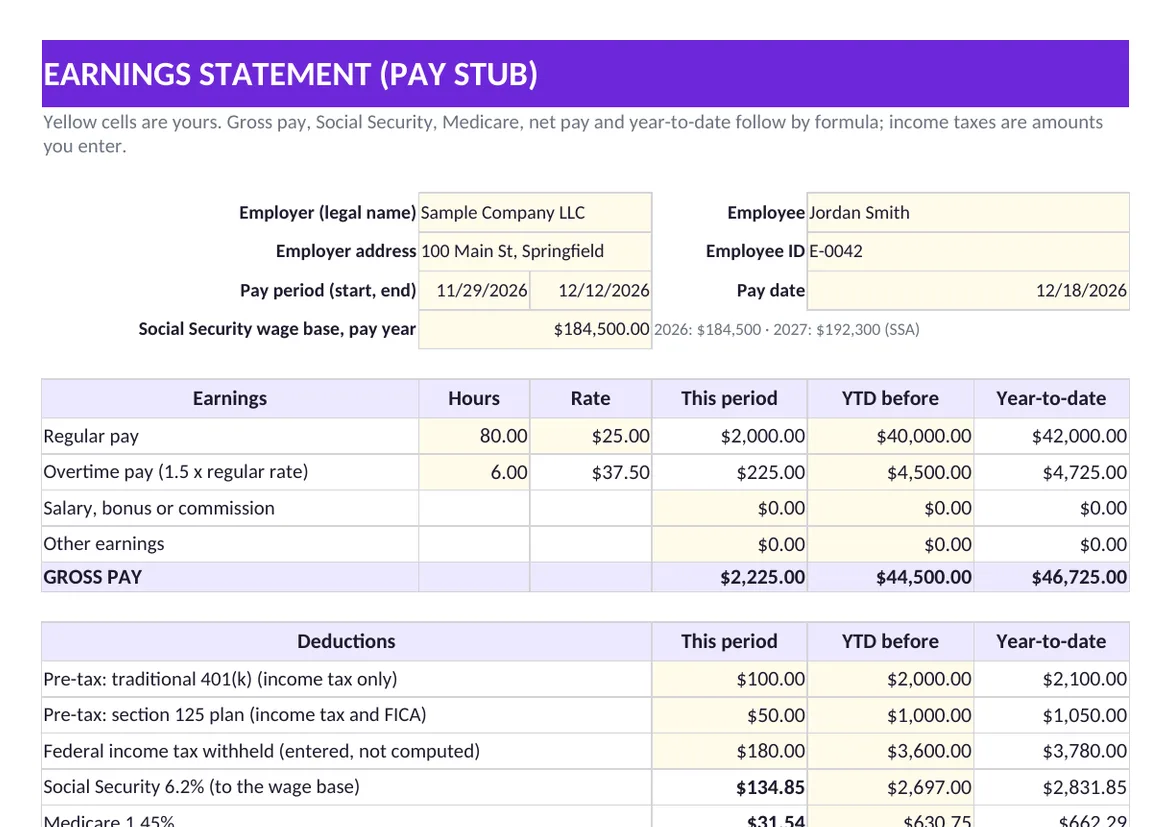
This free pay stub template is an earnings statement an employer, including a household employer, can fill in and hand to an employee with each paycheck. In Excel, type the hours, rates and deductions in the yellow cells: gross pay, overtime at 1.5 times the rate, Social Security, Medicare, the Additional Medicare Tax, total deductions, net pay and every year-to-date column follow by formula. The calculator above does the same math for one pay period.
Two limits up front. The template does not compute federal or state income tax withholding: enter the amounts your payroll method gives, or estimate the federal one with the paycheck calculator. And it is for real wages only: a pay stub made up for a job or an amount that does not exist, to get a loan, an apartment or benefits, is fraud. Draivix does not run payroll or make pay stubs; this template is a free tool.
What Goes on a Pay Stub
| Line | How the template figures it | Source |
|---|---|---|
| Regular and overtime pay | Hours × rate; overtime hours × 1.5 × rate | DOL Fact Sheet #23 |
| Pre-tax deductions | Your amounts: a traditional 401(k) deferral is not subject to income tax withholding but stays in Social Security and Medicare wages; qualifying section 125 benefits are generally excluded from both | IRS Pub. 15 (2026) |
| Federal income tax | Your amount (from IRS Pub. 15-T or your provider) | Not computed |
| Social Security | 6.2% of Social Security wages until the year's wages reach the wage base | SSA, IRS |
| Medicare | 1.45% of all Medicare wages; no wage base | IRS Tax Topic 751 |
| Additional Medicare Tax | 0.9% of the wages paid to the employee above $200,000 in the calendar year | 26 U.S.C. § 3102(f), IRS |
| State and local taxes, SDI, paid leave | Your amounts; they differ by state | Not computed |
| Net pay | Gross pay minus all deductions | Arithmetic |
| Year-to-date | Prior year-to-date (your input) plus this period, for every line | Arithmetic |
Social Security wage base: $184,500 for 2026 and $192,300 for 2027, both published by the Social Security Administration; the template has a yellow cell for it. The employer withholds the Additional Medicare Tax from the pay period in which wages paid to the employee pass $200,000 in the calendar year, regardless of filing status; the employee's own threshold on the tax return may differ, but that is not the employer's withholding question (26 U.S.C. § 3102(f), IRS Tax Topic 751, last reviewed November 9, 2026).
Is a Pay Stub Required? Federal Law and State Rules
The U.S. Department of Labor answers directly: "the FLSA does not require an employer to provide employees pay stubs", but it does require accurate records of hours worked and wages paid (DOL FLSA questions and answers). The records include, among other items, hours worked each workday and each workweek, straight-time and overtime earnings, additions and deductions, total wages paid and the date of payment and pay period (29 CFR 516.2(a)). A pay stub that shows those items helps meet the record rule, but the requirement to hand one to the employee comes from state law.
| State | Pay statement rule | Source |
|---|---|---|
| California | Semimonthly or with each payment of wages, an accurate itemized statement showing (1) gross wages, (2) total hours worked, (3) piece-rate units and rates, (4) all deductions, (5) net wages, (6) the dates of the pay period, (7) the employee's name and only the last four digits of the Social Security number or an employee ID, (8) the name and address of the employer, (9) all hourly rates with the hours at each. Copies kept for at least three years. An employee injured by a knowing and intentional failure may recover the greater of actual damages or $50 for the first pay period and $100 for each later one, up to $4,000 in total, plus costs and attorney's fees. The section does not apply to household workers of a private residence, and government employers are bound only by its Social Security number rule. | Cal. Lab. Code § 226(a), (d), (e), (i) |
| New York | A statement with every payment of wages listing the dates of work covered, the employee's name, the employer's name, address and phone number, the rate or rates of pay and their basis, gross wages, deductions, allowances claimed as part of the minimum wage, and net wages; for employees not exempt from overtime also the regular and overtime rates and the regular and overtime hours worked. | N.Y. Lab. Law § 195(3) |
| Texas | At the end of each pay period, a written earnings statement signed by the employer or its agent, showing the employee's name, rate of pay, total pay earned, each deduction and its purpose, pay after deductions and hours worked (or units for piece rate). This applies under the Texas Minimum Wage Act, which does not apply to a person covered by the federal FLSA. | Tex. Lab. Code §§ 62.003, 62.151 |
These are the three states whose statute we read on November 23, 2026; it is not a 50-state list. Many other states require a pay statement with different items. Check your state labor department before the first payroll.
Worked Example and How to Use the Template
An hourly employee earns $25 an hour, works 80 regular hours and 6 overtime hours in a biweekly pay period in 2026, contributes $100 to a traditional 401(k) and $50 to a section 125 health plan. Gross pay is $2,000.00 + $225.00 = $2,225.00. Social Security and Medicare wages are $2,225.00 − $50.00 = $2,175.00, so Social Security is $134.85 and Medicare $31.54. With $180.00 of federal income tax and $70.00 of state tax entered, total deductions are $566.39 and net pay is $1,658.61 (computed; the calculator and the Excel sample reproduce it). If the same employee had already been paid $183,000 earlier in 2026, only $1,500 would remain under the wage base, so Social Security would be $93.00.
Fill in the employer and employee blocks (use only the last four digits of the Social Security number or an employee ID), the pay period and pay date, the hours and rates, the deductions and the prior year-to-date amounts. Check that the wage base cell matches the year the wages are paid. Print the PDF or send the stub as a file the employee can keep.
Common mistakes
- Taking Social Security out of a 401(k) deferral: it reduces income tax wages, not Social Security and Medicare wages.
- Continuing Social Security after the year's wages pass the wage base.
- Starting the Additional Medicare Tax at the employee's filing status threshold instead of $200,000 of wages from your company.
- Showing the full Social Security number on the stub.
- Leaving the employer's legal name and address or the pay period dates off the stub in California.
Household Employers
A family that pays a nanny, housekeeper or caregiver can use the same template. Social Security and Medicare apply to a household worker paid $3,000 or more in cash wages in 2026, except wages paid to your spouse, your child under 21, your parent or an employee under 18 (the publication lists exceptions for the last two), and the employer may pay the employee's share instead of withholding it (IRS Publication 926 (2026)).
Fake Pay Stubs, and What Draivix Does
A pay stub is evidence of income. Making one for a job that does not exist or with inflated figures, and using it to influence a federally insured bank or credit union on a loan application, can be a federal crime: 18 U.S.C. § 1014 provides for a fine of up to $1,000,000, prison of up to 30 years, or both (18 U.S.C. § 1014). The template is for employers documenting wages they actually paid.
Draivix does not run U.S. payroll, compute withholding, file taxes or print pay stubs. Time & Attendance records clock ins and clock outs and builds the monthly attendance sheet; payroll inputs pull the hours and days worked from that sheet, add bonuses that team leads enter, and notify the payroll accountant once a director approves the inputs. Your payroll provider or accountant then pays the wages and issues the statements.
Last reviewed: November 23, 2026, against the SSA contribution and benefit base page, IRS Tax Topic 751 and Publication 926, 26 U.S.C. § 3102, 29 CFR 516.2, the DOL FLSA FAQ and the state statutes linked. This page is general information, not legal or tax advice.
Sources and legal basis
- U.S. Department of Labor: questions and answers about the FLSA (are pay stubs required?)
- 29 CFR 516.2: records of hours worked
- Social Security Administration: contribution and benefit base ($192,300 for 2027)
- IRS Tax Topic 751: Social Security and Medicare withholding rates (last reviewed November 9, 2026)
- IRS Publication 15 (2026), (Circular E), Employer's Tax Guide
- 26 U.S.C. § 3102(f): Additional Medicare Tax withholding over $200,000, current through Public Law 119-142
- IRS Publication 926 (2026): Household Employer's Tax Guide
- California Labor Code § 226: itemized wage statements (Wayback capture of September 28, 2026)
- New York Labor Law § 195(3): wage statement with every payment of wages (Wayback capture of November 23, 2025)
- Texas Labor Code ch. 62 (Texas Minimum Wage Act), §§ 62.003 and 62.151, Texas Legislature statutes
- 18 U.S.C. § 1014: loan and credit applications generally
- DOL Fact Sheet #23: overtime pay under the FLSA
Facts verified:
02Frequently Asked Questions
Are employers required to give pay stubs?
Not under federal law: the FLSA requires records of hours and wages but not a pay stub. Many states do require a pay statement, for example California (Lab. Code § 226) and New York (Lab. Law § 195(3)).
What must a pay stub show in California?
Nine items: gross wages, total hours, piece-rate units and rates, all deductions, net wages, the pay period dates, the employee's name and last four digits of the SSN or an employee ID, the employer's legal name and address, and every hourly rate with the hours at that rate (Lab. Code § 226(a)).
How do I make a pay stub for my employee?
Enter the hours, rate and deductions in the template; it computes gross pay, Social Security (6.2% up to the wage base), Medicare (1.45%), net pay and year-to-date. Enter federal and state income tax from your payroll method.
How is Social Security calculated on a pay stub?
6.2% of the period's Social Security wages until the year's total reaches the wage base: $184,500 in 2026 and $192,300 in 2027. Section 125 deductions reduce those wages; 401(k) deferrals do not.
When does the Additional Medicare Tax show on a pay stub?
From the pay period in which the wages your company pays the employee pass $200,000 in the calendar year; the employer withholds 0.9% of the excess regardless of filing status.
Is it legal to make your own pay stub?
An employer may produce pay stubs for wages it actually paid. Creating a stub for income you did not receive and using it to obtain a loan is fraud, and for federally insured lenders a crime under 18 U.S.C. § 1014.
03More Free Tools
Related Templates & Calculators
- Free Invoice Generator: Online, PDF & Excel TemplateFree invoice generator: fill in the lines online and print or save the invoice as PDF. No sign-up. Plus an Excel invoice template with numbering and sales tax.Open
- Employment Verification Letter: Free Template & SampleEmployment verification letter template for employers: dates, job title, status, and pay only with written consent. Excel and PDF with an authorization form.Open
- Time and a Half Calculator: Overtime Pay With BonusTime and a half calculator: 1.5 times your hourly rate, overtime pay for the week, and the regular rate when a bonus or shift differential is paid. Free Excel.Open
- Profit Margin Calculator: Gross, Operating & Net MarginProfit margin calculator: gross, operating and net margin from your income statement, margin vs. markup, and the price for a target margin. Excel price list.Open
Let’s start together
Tell us how your business works.
We will show you what a system that takes over part of that work could look like.
Book a consultation