
01Free Template · Excel and PDF
Timesheet Template: Free Weekly, Biweekly & Monthly (Excel + PDF)
Free timesheet template in Excel and printable PDF: weekly, biweekly and monthly sheets with lunch breaks, automatic hours and overtime after 40 hours.
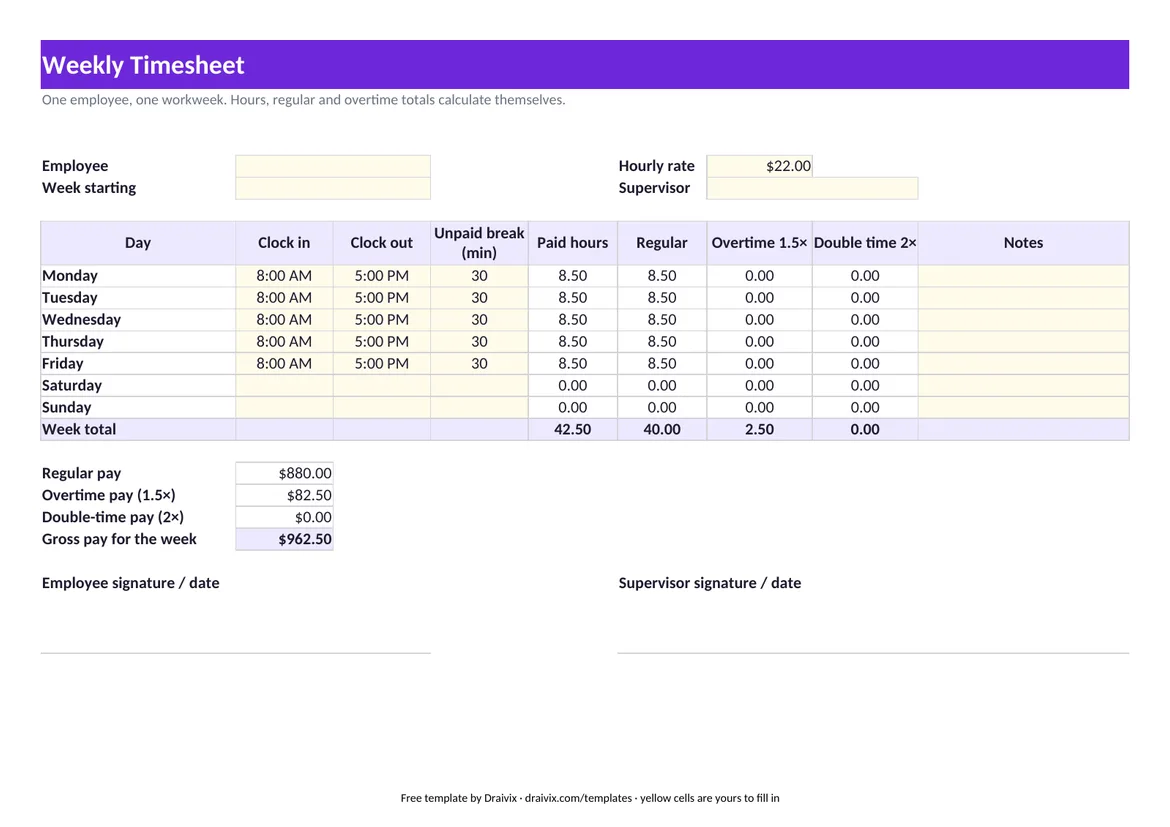
What a Timesheet Has to Record
The template follows the records federal law expects an employer to keep for each non-exempt worker. Among the 14 items the Department of Labor lists are the day and time the workweek begins, the hours worked each day, the total hours worked each workweek, the regular hourly rate and the overtime earnings for the week (DOL Fact Sheet #21).
| On the timesheet | Why it is there |
|---|---|
| Employee and week starting | Ties the hours to one person and one fixed workweek |
| Clock in and clock out for each day | Hours worked each day, the base of everything else |
| Unpaid break in minutes | Separates the unpaid lunch from paid time |
| Regular and overtime hours | Total hours each workweek and the overtime owed on them |
| Hourly rate and gross pay | Regular rate and the week's straight-time and overtime earnings |
| Employee and supervisor signature | Both confirm the hours before payroll runs |
Weekly, Biweekly or Monthly: Which Sheet to Use
- Weekly. One page per workweek. The simplest sheet for hourly staff, because overtime is counted per workweek.
- Biweekly. Two workweeks on one page for a 26-paycheck payroll. The sheet totals overtime for each week separately: 45 hours in week one and 35 in week two is 5 hours of overtime, not zero.
- Monthly. 31 rows for salaried and project staff who report hours once a month. For hourly staff, still compute overtime by workweek.
Need daily overtime and double time? The California overtime calculator has the daily rules built in. Need to check a single week quickly? Use the time card calculator.
When the Spreadsheet Stops Being Enough
Paper and Excel timesheets fail in predictable ways: hours written from memory on Friday, a file per person per week, corrections nobody can trace. Employers keep payroll records for at least three years and time cards for two (DOL Fact Sheet #21), which is a lot of files.
Draivix Time & Attendance replaces the typing: employees clock in with a badge at a terminal, in a browser or on a phone, the system pairs the punches into shifts and the supervisor approves the timesheet. Manual corrections go through review, and an approved period is locked. Project teams log hours against jobs in Timesheets & Time Tracking.
Last reviewed: November 18, 2026. This page explains general rules and is not legal advice.
02Frequently Asked Questions
Is the timesheet template free to use for my business?
Yes. The Excel workbook is unlocked, has no macros and no email gate, and you may change it and use it commercially. The PDF prints on US Letter paper.
Does the template calculate overtime automatically?
Yes. Each workweek totals paid hours and splits them into regular hours up to 40 and overtime above 40, then multiplies by the hourly rate you enter. On the biweekly sheet each week is calculated on its own.
Does it work in Google Sheets?
Yes. Upload the .xlsx file to Google Drive and open it with Google Sheets; the formulas use standard functions that work in Sheets, Excel and LibreOffice.
How long do employers have to keep timesheets?
Under federal rules, payroll records are kept for at least three years and the records wage calculations are based on, such as time cards, for two years. Some states require longer.
03More Free Tools
Related Templates & Calculators
- Employee Schedule Template: Weekly Work Schedule (Excel)Free weekly employee schedule template in Excel and PDF: shifts for 12 employees, hours per person, staff per day and a flag for weeks over 40 hours.Open
- Invoice Template: Free Excel & Printable PDF (US)Free invoice template in Excel and PDF for US businesses: line items, sales tax rate, shipping, Net 30 due date and automatic totals. No sign-up.Open
- Purchase Order Template with 3-Way Match (Excel, PDF)Free purchase order template in Excel and PDF, with a three-way match sheet that compares PO, receipt and supplier invoice and flags lines to hold.Open
- Work Order Template: Service & Maintenance (Excel, PDF)Free work order template in Excel and PDF for service, maintenance and installation jobs: asset, work performed, parts, labor, tax and customer sign-off.Open
Let’s start together
Tell us how your business works.
We will show you what a system that takes over part of that work could look like.
Book a consultation