
01Free Online Calculator + Excel Workbook
Military Time Converter and Conversion Chart (24-Hour Clock)
Convert regular time to military time and back, with midnight (0000), noon (1200) and 2400, a printable chart and the federal rule on rounding punches.
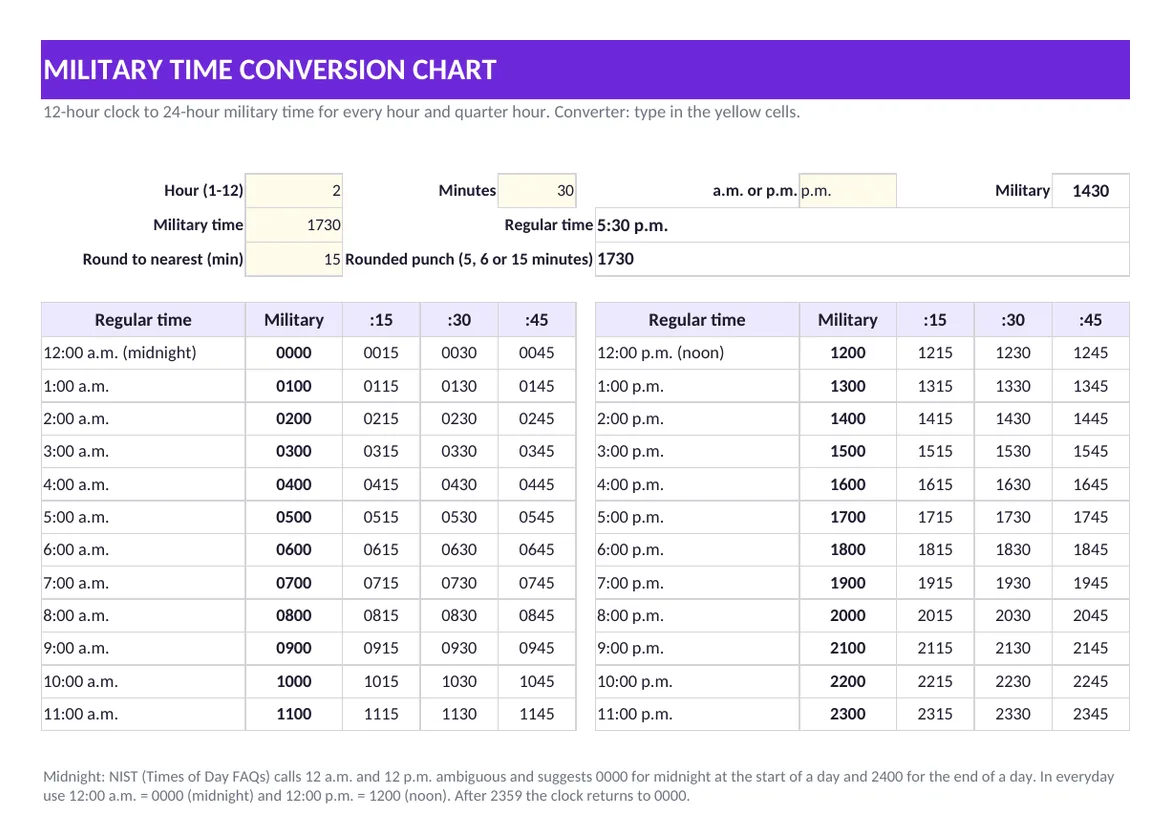
Military Time Converter
Converts clock times only; it does not add up hours worked or decide whether a rounding policy is lawful: that depends on whether it averages out over time (29 CFR 785.48(b)) and on stricter state rules.
Military time is the 24-hour clock written as four digits without a colon: the first two are the hour from 00 to 23, the last two the minutes. From 1:00 a.m. to 12:59 p.m. the digits stay the same with a leading zero (9:30 a.m. = 0930, 12:15 p.m. = 1215). From 1:00 p.m. to 11:59 p.m. add 12 to the hour (2:30 p.m. = 1430, 10:45 p.m. = 2245). The hour after midnight starts at 0000, so 12:30 a.m. is 0030. To read military time, subtract 12 from any hour above 12: 1730 is 5:30 p.m.
The converter above works both ways and can also round a time clock punch to the nearest 5, 6 or 15 minutes, the increments federal law accepts for payroll if the rounding averages out. The chart below and the printable version (US Letter, PDF and Excel) list every hour with its quarter hours.
Military Time Conversion Chart
| Regular time | Military time | Regular time | Military time |
|---|---|---|---|
| 12:00 a.m. (midnight) | 0000 | 12:00 p.m. (noon) | 1200 |
| 1:00 a.m. | 0100 | 1:00 p.m. | 1300 |
| 2:00 a.m. | 0200 | 2:00 p.m. | 1400 |
| 3:00 a.m. | 0300 | 3:00 p.m. | 1500 |
| 4:00 a.m. | 0400 | 4:00 p.m. | 1600 |
| 5:00 a.m. | 0500 | 5:00 p.m. | 1700 |
| 6:00 a.m. | 0600 | 6:00 p.m. | 1800 |
| 7:00 a.m. | 0700 | 7:00 p.m. | 1900 |
| 8:00 a.m. | 0800 | 8:00 p.m. | 2000 |
| 9:00 a.m. | 0900 | 9:00 p.m. | 2100 |
| 10:00 a.m. | 1000 | 10:00 p.m. | 2200 |
| 11:00 a.m. | 1100 | 11:00 p.m. | 2300 |
Minutes carry over unchanged: 7:15 a.m. is 0715, 7:15 p.m. is 1915, and 11:59 p.m. is 2359, the last minute of the day. The printable chart adds the :15, :30 and :45 column for every hour and a converter with yellow input cells. For hours and minutes as decimals for payroll (7:45 = 7.75 hours), use the decimal hours converter; for the hours of a whole week with lunch breaks and overtime, the time card calculator.
Midnight, Noon and 2400
"12 a.m." and "12 p.m." are where most mistakes happen. The National Institute of Standards and Technology says that 12 a.m. and 12 p.m. are ambiguous and should not be used, because noon is neither before nor after noon, and names the 24-hour clock as another option: 0000 for midnight at the beginning of a day and 2400 for the end of a day (NIST Times of Day FAQs). In everyday U.S. use, and in this converter, 12:00 a.m. means midnight (0000) and 12:00 p.m. means noon (1200); the result always names noon or midnight so nobody has to guess.
2400 and 0000 are the same moment seen from two days: a shift that ends at midnight on Friday ends at 2400 Friday, which is 0000 Saturday. On a time card, write the date with every punch, so a punch at midnight reads 0000 on the next date; 2400 is useful on a schedule or in a contract deadline to make clear which day is meant. NIST also suggests 11:59 p.m. or 12:01 a.m. for deadlines in legal documents. A time such as 2430 does not exist: after 2359 the clock goes back to 0000.
Military Time on Time Cards: How Payroll Rounds Punches
| Punch | Nearest quarter hour | Difference | Nearest 5 minutes |
|---|---|---|---|
| 0753 | 0800 | +7 minutes | 0755 |
| 0807 | 0800 | −7 minutes | 0805 |
| 1652 | 1645 | −7 minutes | 1650 |
| 1653 | 1700 | +7 minutes | 1655 |
| 2153 | 2200 | +7 minutes | 2155 |
Computed with the converter. Federal law does not require time clocks, but when an employer rounds the recorded start and stop times, 29 CFR 785.48(b) accepts rounding "to the nearest 5 minutes, or to the nearest one-tenth or quarter of an hour" for enforcement purposes only if it is used so that it does not, over a period of time, result in failing to pay employees for all the time they actually worked. Rounding to the nearest increment goes both ways, as the table shows; a rule that always rounds start times up and end times down does not average out. Early or late punches with no work done may be disregarded (785.48(a)).
The FLSA requires records of the hours worked each workday and the total hours each workweek (29 CFR 516.2(a)(7)), and a workday there is any fixed period of 24 consecutive hours, which is why night shifts that cross 0000 need the date with every punch. Some states set stricter rules on rounding; check your state before you set the time clock.
Worked Example and How to Use the Converter
A night-shift employee clocks in at 2153 and out at 0611 the next morning. Quarter-hour rounding gives 2200 and 0615 (the converter shows +7 and +4 minutes). The rounded shift runs from 2200 to 2400, 2 hours, plus 0000 to 0615, 6 hours 15 minutes: 8 hours 15 minutes, or 8.25 decimal hours. The punches themselves cover 8 hours 18 minutes, so this shift is 3 minutes short; over many shifts the differences in both directions must even out (computed).
Pick the direction. For regular to military time, enter the hour, the minutes and a.m. or p.m.; for military to regular time, type the four digits (0930 can be typed as 930). Optionally choose a rounding increment to see the rounded punch. The printable chart fits one US Letter page; its converter cells work the same way in Excel.
Common mistakes
- Writing 12:30 a.m. as 1230: it is 0030, half an hour after midnight; 1230 is half past noon.
- Adding 12 to 12:00 p.m.: noon stays 1200.
- Subtracting hours across midnight without adding 24: 0611 minus 2153 is 8 hours 18 minutes, not a negative number.
- Reading 1300 as 13 minutes past something: it is 1:00 p.m.
- Rounding every punch in the employer's favor, which 29 CFR 785.48(b) does not accept.
Clock Ins in 24-Hour Time in Draivix
Draivix Time & Attendance records each clock in and clock out from a badge terminal, a browser or a phone, pairs them into shifts and builds the timesheet a supervisor approves; corrections go through review and an approved month is locked. Payroll inputs pull the hours worked from the month's attendance sheet. Draivix does not run U.S. payroll or file taxes; your payroll provider pays the wages.
Last reviewed: November 23, 2026, against the NIST Times of Day FAQs and 29 CFR 785.48 and 516.2 on eCFR. Conversions are arithmetic. This page is general information, not legal advice.
02Frequently Asked Questions
How do I convert military time to regular time?
If the hour is 13 or more, subtract 12 and add p.m.: 1730 is 5:30 p.m. From 0100 to 1159 the time is a.m. (0945 is 9:45 a.m.), 1200 to 1259 is after noon (1215 is 12:15 p.m.), and 0000 to 0059 is just after midnight (0030 is 12:30 a.m.).
What time is 1300 in military time?
1300 is 1:00 p.m. Every hour after noon adds 12: 1500 is 3:00 p.m., 1800 is 6:00 p.m. and 2300 is 11:00 p.m.
Is midnight 0000 or 2400?
Both are used for different purposes. NIST suggests 0000 for midnight at the beginning of a day and 2400 for the end of a day. On a time card, record the date with each punch so a midnight punch reads 0000 on the next date.
What is 12:30 a.m. in military time?
0030. The first hour of the day runs from 0000 to 0059; 1230 is 12:30 p.m., half past noon.
Can an employer round time clock punches?
Under federal law, rounding to the nearest 5 minutes, tenth or quarter of an hour is accepted if, over time, employees are still paid for all the time they actually worked (29 CFR 785.48(b)). Some states are stricter.
How do I calculate hours worked in military time?
Subtract the start from the end in hours and minutes; if the shift crosses midnight, add 24 hours to the end time first. 2200 to 0615 is (24:00 − 22:00) + 6:15 = 8 hours 15 minutes, 8.25 decimal hours.
03More Free Tools
Related Templates & Calculators
- Job Application Template: Free Employment ApplicationFree employment application form for employers in Excel and PDF, without the questions the EEOC warns against, plus the I-9, background check and record rules.Open
- COGS Calculator: Cost of Goods Sold Formula and FIFO, LIFOCalculate cost of goods sold with the IRS formula, compare FIFO, LIFO and average cost for five purchase lots, and get gross margin. Free Excel with formulas.Open
- Pay Stub Template: Free Excel Earnings StatementFree pay stub template for employers: an Excel earnings statement with gross pay, Social Security, Medicare, deductions, net pay, year-to-date and state rules.Open
- Free Invoice Generator: Online, PDF & Excel TemplateFree invoice generator: fill in the lines online and print or save the invoice as PDF. No sign-up. Plus an Excel invoice template with numbering and sales tax.Open
Let’s start together
Tell us how your business works.
We will show you what a system that takes over part of that work could look like.
Book a consultation